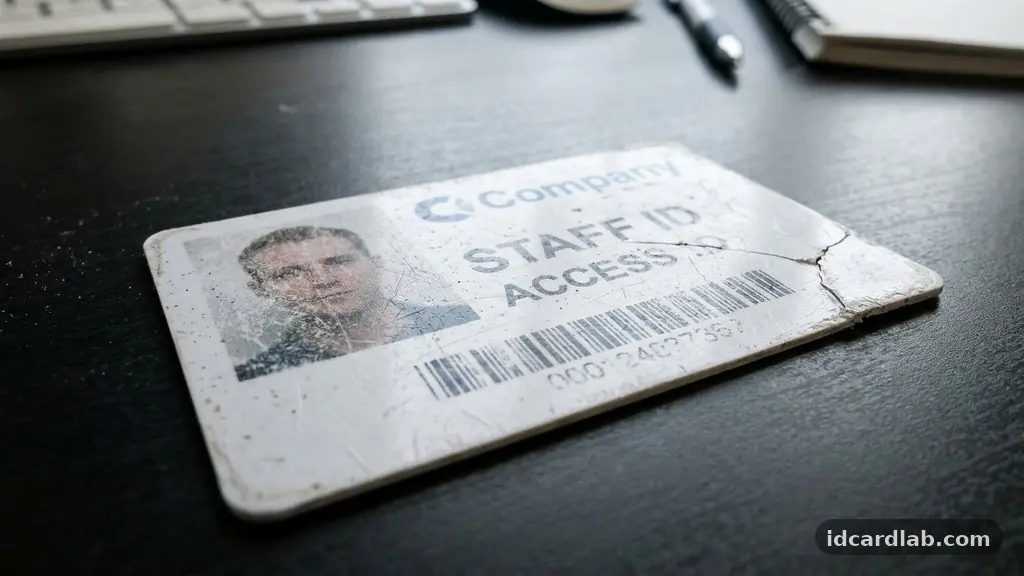
Learning the best methods for storing and handling printed ID cards to extend their lifespan is essential for maintaining both security and professional appearance. Whether you manage access control for a large corporation or maintain membership badges, the physical integrity of your cards directly impacts their functionality. By understanding how environmental factors and daily usage patterns affect PVC card stock, you can prevent premature degradation and costly reprints.
This article explains the precise techniques for protecting your credentials, ensuring that every magnetic stripe and smart card chip remains readable for years rather than months. Investing a little effort into proper care today saves significant time, money, and administrative headaches down the line.
The most effective way to ensure longevity is to treat your badge as a piece of sensitive technology rather than a simple piece of plastic. High-quality ID cards are typically manufactured using PVC card stock, which is durable but sensitive to specific physical and chemical stressors. When you prioritize storing and handling printed ID cards to extend their lifespan, you avoid the common pitfalls of cracking, fading, or data corruption.
The primary goal is to minimize direct friction, exposure to extreme temperatures, and contact with substances that degrade the printed image or the embedded electronics. Following these core principles will keep your credentials functioning correctly and looking professional in any environment.
Understanding the Vulnerabilities of PVC Cards
Most modern identification badges rely on dye-sublimation printing, a process that embeds pigment into the surface of the plastic. While this method creates high-resolution images, the printed layer can be susceptible to wear if not properly protected.
PVC is a porous material that reacts to environmental conditions, meaning it can warp or become brittle when exposed to rapid temperature shifts. Understanding these material properties is the first step in protecting your investment in high-quality printing supplies.
One major, often overlooked issue is plasticizer migration. This occurs when chemicals within the card react with soft vinyl holders, leading to a sticky residue or a faded image over time.
You should always opt for rigid, non-migratory plastic holders to prevent this chemical breakdown. By keeping the card isolated from reactive surfaces, you ensure the integrity of the print remains sharp and clear.
The Role of Protective Sleeves and Holders
A rigid card holder is the single most effective barrier against physical damage. These holders prevent the card from bending, which is critical for protecting the internal circuitry of a smart card chip.
When a card flexes too much, the delicate connections inside the chip can fracture, rendering the card useless for contactless RFID technology. A rigid housing acts as an exoskeleton, absorbing the pressure that would otherwise damage the card’s internal components.
When selecting a holder, look for those that are specifically labeled as “non-migratory” or “PVC-free.” These materials are engineered not to interact with the dye-sublimation ink on your cards.
If you use a lanyard, ensure the attachment point does not create a stress concentration at the card’s slot punch area. A reinforced slot or a side-loading holder can distribute weight more evenly, preventing the plastic from cracking under the constant tension of daily wear.
Managing Environmental Exposure
Environmental humidity and UV exposure are silent killers of printed credentials. Prolonged exposure to direct sunlight causes the colors in your card printer ribbon to degrade, leading to significant fading over time.
Furthermore, high humidity can cause moisture to seep into the layers of the card, potentially leading to delamination. You should store unused stock in a cool, dry environment, preferably in a light-proof container to maintain its chemical stability.
Think of your ID cards like high-end electronic equipment rather than office supplies. If a card is left on a dashboard in the summer, the heat can cause the PVC to soften, which often leads to permanent warping.
If you work in an outdoor environment, consider using a sealed, weather-resistant holder that provides an extra layer of defense against the elements. These simple precautions significantly reduce the rate of natural decay.
Handling Magnetic Stripes and Smart Chips
The functional parts of an ID card—the magnetic stripe and the embedded chip—require specific handling protocols to remain operational. Magnetic stripes are susceptible to demagnetization if placed near strong magnets, such as those found in speakers, heavy machinery, or even certain clasp-style purses. You should encourage users to avoid keeping their cards in the same pocket as their smartphones, as the electromagnetic interference can slowly corrupt the data stored on the stripe.
Smart card chips are equally sensitive, particularly to static electricity and physical scratches. While the chip is usually recessed, the contact points can become dirty or oxidized if exposed to oils from human skin.
If a card stops working, a common culprit is a buildup of debris on the contact pads. You can safely clean these areas with a small amount of isopropyl alcohol and a lint-free cloth, but avoid using abrasive materials that could scratch the surface.
Standards for Card Durability
Following industry standards helps ensure that your cards are manufactured to withstand the rigors of daily use. Most organizations should aim to meet ISO 7810 standards, which define the physical dimensions and durability requirements for identification cards. These standards cover aspects like resistance to bending, heat, and chemical exposure, providing a benchmark for what you should expect from your hardware.
| Factor | Risk Level | Mitigation Strategy |
|---|---|---|
| UV Exposure | High | Use UV-resistant holders |
| Heat/Humidity | Medium | Store in climate-controlled areas |
| Physical Bending | Critical | Use rigid plastic protectors |
| Magnetic Interference | High | Keep away from electronic devices |
By aligning your storage practices with these formal benchmarks, you move away from guesswork and toward a systematic approach to asset management. Adhering to these specifications ensures that your cards remain compatible with standard readers across different facilities. It also creates a consistent expectation for how long a card should last before it requires a mandatory replacement.
Best Practices for Daily Usage
How you wear or carry your ID card changes its lifespan drastically. Many people clip their cards to their belts, which exposes them to constant friction against clothing and potential impact with door frames or desks.
If you must wear your card, a lanyard that keeps the badge flat against your chest is generally safer than a belt clip. This position minimizes the chance of the card being caught on objects or bent while you move throughout the day.
If your role requires frequent use of a proximity reader, avoid “fanning” the card against the reader surface. While contactless RFID technology is designed for convenience, repeatedly slamming the card against a plastic casing can eventually cause micro-cracks in the antenna wire hidden within the card.
A gentle tap or simply holding the card near the reader is sufficient to trigger the signal. Educating your team on these small behavioral adjustments can add months, or even years, to the life of every card in your system.
Maintenance and Cleaning Cycles
Regular maintenance is not just for the card printer; it is for the cards themselves. Periodically inspecting your fleet of ID cards allows you to catch signs of wear before the card completely fails.
Look for signs of peeling edges or faint printing, which often indicate that the protective topcoat is wearing thin. If you notice these signs, it may be time to replace the card rather than waiting for it to stop working at a critical moment.
Cleaning your cards is a straightforward process that requires minimal equipment. A soft, microfiber cloth is usually sufficient for removing daily grime and skin oils.
For more stubborn residue, a specialized card cleaning kit can be effective, but avoid harsh chemicals that could dissolve the printed image. You can find more information about maintaining access control hardware at the International Organization for Standardization website.
Frequently Asked Questions
Can I laminate my ID cards to make them last longer?
While thermal lamination can provide extra protection, it is not always recommended for standard PVC cards. Many cards are already manufactured with a protective overlay that serves this purpose. If you choose to laminate, ensure you use a machine designed for cards to avoid warping the internal electronics.
Why does my card stop working even though it looks fine?
This is usually caused by internal damage to the antenna or the chip, which cannot be seen from the outside. Excessive bending or exposure to high-heat environments can cause these internal components to fail. Even a microscopic break in the wire is enough to stop the card from communicating with the reader.
How do I know if my card holder is causing damage?
If you notice a sticky or tacky feel on the surface of your card after removing it from its holder, the material is likely reacting with the plasticizer in the holder. This chemical reaction will eventually ruin the print. You should replace any holder that causes this reaction with a rigid, non-migratory alternative.
Is there a specific way to store cards that are not in use?
Yes, store inactive cards in a cool, dark, and dry place. Keep them in a stack with a flat weight on top to prevent warping. Avoid storing them in areas with high electromagnetic activity or near cleaning chemicals, as these can degrade both the printing and the electronic components.
How often should I replace my ID cards?
The lifespan of a card depends on the environment and how well it is cared for. On average, a well-maintained card should last between three to five years. If you notice significant fading, edge peeling, or intermittent read failures, it is time to cycle that card out of your system.
Conclusion
Taking proactive steps toward storing and handling printed ID cards to extend their lifespan is a simple way to maintain operational efficiency. By selecting the right holders, avoiding harsh environments, and teaching users how to interact with proximity readers, you significantly reduce the frequency of card replacements. These habits protect the integrity of your PVC cards and the sensitive electronics housed within them.
If you follow these guidelines, you will find that your identification badges remain functional and professional for as long as they are needed. Start by auditing your current storage methods today, and you will notice the difference in the durability and reliability of your credentials almost immediately. Consistent care ensures that your security and identification systems continue to serve your organization without unnecessary interruption or expense.