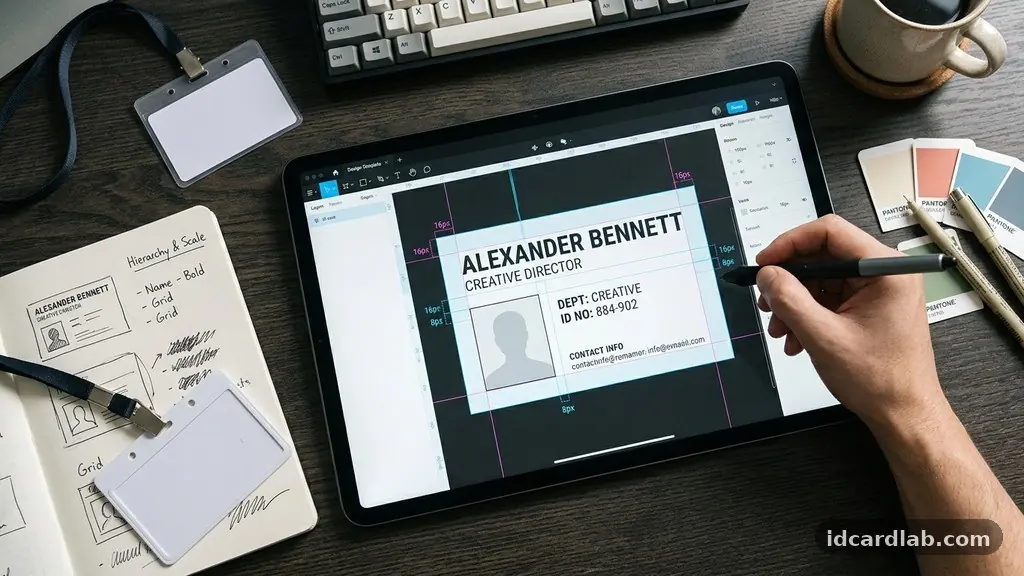
Designing a Professional ID Card requires a careful balance between aesthetic appeal and functional security. When you focus on clarity and visual hierarchy, you ensure that employees or visitors can be identified quickly while maintaining your organization’s brand identity. Whether you are using standard PVC materials or advanced smart cards, the principles of effective design remain the same.
This article provides the essential technical and creative strategies to help you produce credentials that look polished, remain durable, and serve their purpose effectively. By mastering these layout, font, and color techniques, you will create identification materials that reflect your institutional standards and professional rigor.
Establishing the Visual Hierarchy
Visual hierarchy is the secret to a functional ID card. It dictates the order in which the human eye perceives information.
You want the cardholder’s name and photo to be the most prominent elements, followed by their title and the company logo. If every piece of information on the card has the same size and weight, the viewer will struggle to find critical data in an emergency.
Start by placing the portrait in a consistent location, typically the left or right third of the card. Use a clear, high-resolution image to ensure that security personnel can verify the identity against the person standing in front of them. The name should be placed near the photo, using a font size that is significantly larger than secondary text like employee IDs or expiration dates.
Keep the background clutter-free to maintain this hierarchy. If you include a high-contrast logo, ensure it does not bleed into the text area or obscure the face.
A common mistake is placing too much information on the front of the card. Move non-essential data, such as return addresses or internal policy statements, to the back of the card to keep the front clean and scannable.
Selecting the Right Typography
Typography is often overlooked, but it is the primary driver of readability on a small plastic surface. Avoid decorative or script fonts that can be difficult to read from a distance.
Instead, stick to clean, modern sans-serif typefaces like Helvetica, Arial, or Open Sans. These fonts maintain their integrity even when printed at small sizes, such as 6pt or 8pt.
Hierarchy should be reinforced through font weight rather than just size. Use a bold weight for the individual’s name and a regular weight for their job title or department. You might be tempted to use many colors for text, but sticking to black or a very dark gray provides the best contrast against a light background.
Avoid using more than two different font families on a single card. Too many styles create visual noise and make the credential look amateurish.
If you are designing for a large corporation, check if there is a brand style guide that specifies the required fonts. Consistent typography across all cards helps security teams recognize authorized credentials at a glance.
Working with Color Theory and CMYK
Colors on a screen often look different than colors printed on plastic card stock. You must design your cards in the CMYK color space rather than RGB to ensure the printer produces the colors you expect.
CMYK, which stands for Cyan, Magenta, Yellow, and Key (black), is the standard for physical printing. If you send an RGB file to a printer, the colors may shift or appear duller than intended.
Use your organization’s primary brand colors as accents, but keep the main card body neutral. A white or light-gray background provides the best contrast for black text and color photos. If you choose a dark background, ensure the text is white or another light color to maintain a high contrast ratio.
Avoid using neon or overly bright colors that can make the card look like a toy or a temporary badge. Instead, use a palette of three or four coordinated colors to create a professional look. You can find more information about the technical standards for printing and card production at the official ISO identification card standards page.
Understanding Card Stock and Printing
The material you choose will determine how long the card lasts. PVC is the industry standard for most badges because it is durable, flexible, and compatible with almost every card printer on the market. If you need a card that will be used in harsh environments, consider composite PVC-PET cards, which are more resistant to heat and warping.
Your choice of printer also affects the final output quality. Direct-to-card printers are common, but they leave a small white border around the edge of the card.
If you want a full-bleed design, you will need a retransfer printer that prints the image onto a film before applying it to the card. This process ensures the design covers the entire surface from edge to edge.
Consider the thickness of the card as well. The standard size is 30 mil, which is roughly the thickness of a credit card.
Thinner cards may feel flimsy, while thicker cards might not fit into standard badge holders or card readers. Always test your design on a few sample cards before committing to a full print run for your entire organization.
Integrating Security Features
Professional ID cards are not just for aesthetics; they are tools for access control and security. You can add several layers of protection to prevent counterfeiting.
Microtext is a simple but effective feature where tiny, nearly invisible text is printed in a line, often forming a border or a signature line. This text is difficult to reproduce with standard desktop scanners or consumer-grade printers.
Guilloche patterns are another common security element. These are intricate, interlocking geometric designs that are extremely difficult to replicate or forge. You can place these patterns in the background of the card to add a level of sophistication while making it harder for unauthorized individuals to create fake badges.
Holographic overlays are perhaps the most effective visual deterrent against tampering. These clear, embossed films are applied over the printed card and show a 3D image or logo when tilted under light.
They provide immediate, visual confirmation that the card is authentic. For high-security environments, you may also consider embedding smart chips that store encrypted biometric data.
Layout Considerations for Functional Use
The placement of elements should account for the physical constraints of the card, such as the punch hole for a lanyard attachment. Many designers make the mistake of placing the name or logo too high on the card, only to have it cut off when the hole is punched. Always reserve a “clear zone” at the top center of the card where no text or critical graphics should exist.
You must also consider the orientation of the card. Vertical layouts are becoming more popular because they align better with modern badge holders and are easier to read when clipped to a person’s chest.
Horizontal layouts are more traditional and offer more space for wider logos or long job titles. Choose the orientation that best fits the amount of information you need to display.
Use the following table to help decide which elements should be prioritized on the front and back of your card:
| Element | Front of Card | Back of Card |
|---|---|---|
| Company Logo | Primary | Optional |
| Employee Photo | Primary | No |
| Legal Name | Primary | No |
| Job Title | Primary | No |
| Return Address | No | Primary |
| Security/Emergency Info | Optional | Primary |
Common Design Mistakes to Avoid
Even experienced designers can fall into traps when creating identification cards. The most common error is overcrowding the card.
Every square inch does not need to be filled with information. Leave plenty of “white space” to allow the eyes to rest and to make the essential details stand out.
Another frequent mistake is using low-resolution images. A blurry or pixelated photo on an ID card immediately makes the person look suspicious or the organization look unprofessional. Ensure all logos are vector-based files (like .AI or .EPS) and that photos are taken at a minimum of 300 DPI.
Don’t forget about the bleed area. If you want your design to extend to the very edge of the card, you must extend your background color or image beyond the trim line by at least 1/8 of an inch. This ensures that if the printer shifts slightly during production, you don’t end up with an ugly white sliver on one side of your card.
Frequently Asked Questions
What is the standard size for a professional ID card?
The standard size for an ID card is CR80, which measures 3.375 inches by 2.125 inches. This is the exact size of a standard credit card, ensuring it fits perfectly into wallets, badge holders, and card readers.
Should I include a signature on the ID card?
Including a signature adds a layer of personalization and security. It makes the card harder to forge and provides a secondary way to verify the holder’s identity during a manual check.
How do I prevent the ink from fading on my ID cards?
To prevent fading, use a high-quality printer ribbon and consider adding a protective laminate or clear over-laminate layer. Keeping cards away from direct sunlight and harsh chemicals will also extend their lifespan significantly.
Is it necessary to include an expiration date on every card?
For temporary visitors, an expiration date is essential to prevent unauthorized access after a visit concludes. For permanent employees, an expiration date is still recommended as it forces a periodic update of the photo and information, ensuring the security system remains current.
What is the best way to handle card printing for a small business?
For small businesses, it is often more cost-effective to use a desktop card printer rather than outsourcing to a third-party service. This gives you immediate control over the issuance process and allows you to print cards on-demand as new employees join the team.
Conclusion
Designing a professional ID card is a blend of artistic intent and logistical necessity. By focusing on a clean visual hierarchy, choosing appropriate typography, and utilizing the right printing materials, you create a credential that serves your organization with distinction. Whether you are using simple PVC cards or complex credentials with integrated security features, the effort you put into the layout, fonts, and color choices will pay off in durability and brand perception.
Remember to keep the design functional, prioritize the most critical information, and ensure that your design elements do not interfere with the physical use of the card. Taking these steps ensures that you are effectively designing a Professional ID Card that is both secure and representative of your professional standards.