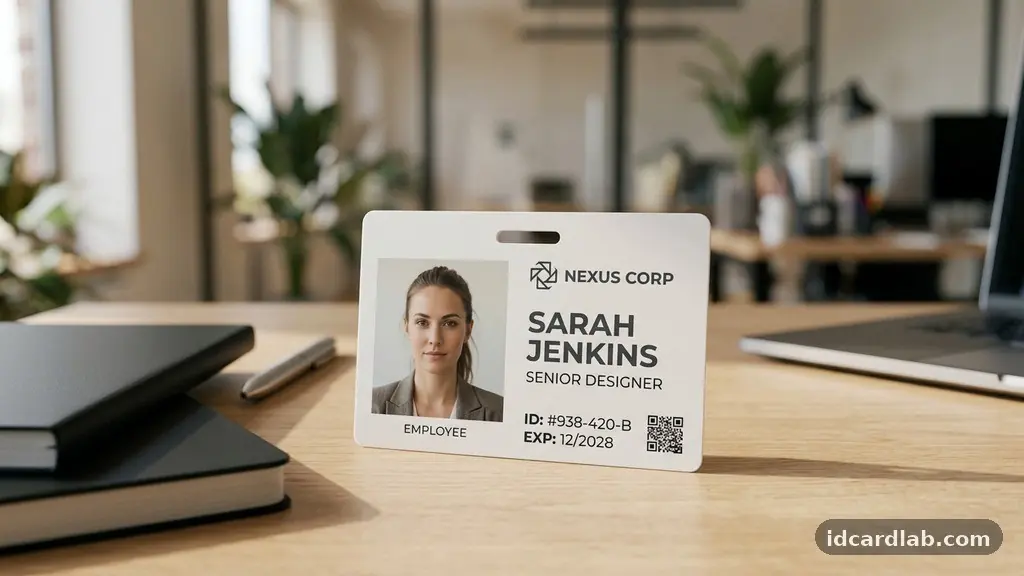
Organizing information on an ID card without cluttering the design requires a disciplined approach to visual hierarchy and functional layout. By prioritizing essential details and grouping secondary data effectively, you ensure that the card remains both professional and highly readable in fast-paced environments. Achieving this balance involves selecting clear typography, utilizing strategic whitespace, and integrating security features in a way that feels intentional rather than forced.
This article explores how to streamline your card layout to maintain clarity, professionalism, and security without overwhelming the viewer. You will learn how to structure your design to prioritize the most critical data while keeping the overall aesthetic clean and functional for daily use.
Prioritizing Essential Data for Instant Recognition
The primary goal of any identification badge is to facilitate quick identification of the bearer. You must place the most critical information—the cardholder’s name and their photograph—in the most prominent positions.
These elements form the foundation of your visual hierarchy, ensuring that the person can be identified at a glance. Avoid crowding these two elements with secondary text, as this dilutes the card’s primary function.
When you begin organizing information on an ID card without cluttering the design, start by mapping out the “hot zone.” This is the upper two-thirds of the card where the human eye naturally lands first.
Place the portrait on the left or center, with the full name in a bold, high-contrast typeface immediately adjacent. By keeping this area clear of logos or decorative graphics, you allow the essential identity of the individual to stand out.
Use a professional, sans-serif font for the name to ensure legibility from a distance. Avoid overly ornate scripts or thin, light weights that might become illegible when scaled down for a standard 3.375-inch by 2.125-inch CR80 card.
If the individual has a long name, consider using two lines rather than shrinking the font size to an unreadable level. This simple adjustment maintains the integrity of the design while ensuring that the identity remains clear.
Leveraging Whitespace and Alignment
Many designers mistakenly view whitespace as empty space that needs to be filled with logos, mission statements, or decorative borders. In reality, whitespace is not empty space; it is a critical design tool that provides breathing room for the eye.
By leaving intentional gaps between the photograph, the name, and the secondary data, you prevent the card from feeling cramped. This sense of openness adds a layer of professionalism and makes the card easier to scan quickly.
Alignment is the backbone of a clean layout. Whether left-justified or centered, ensure that every element adheres to a strict grid system.
If your name and title are left-aligned, make sure the edge of the text block aligns perfectly with the edge of the photo or another major element. Inconsistent alignment creates visual tension that the human brain perceives as clutter, even if the amount of information on the card is relatively low.
Consider the following strategies to maintain a clean, organized look:
- Group related information into logical blocks, such as identity, department, and credentials.
- Use a consistent margin (at least 3-5 millimeters) around the entire perimeter of the card to prevent text from being cut off during printing.
- Apply a single, consistent alignment style (e.g., all left-aligned) rather than mixing centering and justification.
- Limit the total number of colors to three or fewer to prevent visual chaos.
Handling Secondary Data Efficiently
Once the primary identity is established, you must integrate secondary data: department, employee ID number, or expiration date (smaller, neutral font). These details are necessary for verification but should never compete with the person’s name or photo.
The best way to handle this is by reducing the font size and using a lighter color or a thinner font weight. This creates a subtle visual hierarchy where the secondary information supports the primary identity without shouting for attention.
Think of secondary data as the “fine print” of the identification badge. It should be legible enough for a security guard or a coworker to read up close, but it should fade into the background at a distance.
If you have multiple pieces of secondary information, consider placing them in a dedicated strip or a sidebar. Keeping these items grouped together prevents them from appearing as random floating text, which is a common cause of clutter.
If your organization requires a lot of secondary information, consider using a double-sided card. Moving the expiration date, emergency contact info, or corporate disclaimers to the back of the card is a highly effective way to keep the front clean.
This is standard practice in many high-security environments, as it allows for a cleaner, more accessible front design. For more information on international standards for identification, you can refer to the ISO/IEC 7810 physical characteristics guidelines.
Selecting Typography and Color
Typography and color are the most powerful tools in your design kit, yet they are also the easiest to misuse. When designing an ID card, stick to a maximum of two font families to maintain a cohesive appearance.
Use a bold typeface for the name to ensure it pops against the background, and use a standard weight for everything else. This creates an immediate, intuitive distinction between what is most important and what is merely informational.
Color should be used to guide the eye rather than decorate the card. If you use a color for the company logo, consider using a muted version of that same color for secondary text or lines.
This creates a sense of brand harmony without the visual noise of a multi-colored palette. Avoid using bright, neon, or high-saturation colors for text, as these can make the card difficult to read under harsh lighting or when the card surface reflects light.
Contrast is your best friend when organizing information on an ID card without cluttering the design. Dark text on a light background is always the safest bet for high-traffic environments where quick verification is required.
If you must use a background image or a watermark, ensure it has a very low opacity so that it does not interfere with the text. A busy background is the fastest way to turn a professional ID card into a cluttered, unreadable mess.
Strategic Placement of Security Features
Security features are vital for modern identification, but they can easily ruin a clean design if they are placed haphazardly. Holograms, watermarks, and UV inks should be integrated as part of the background or as subtle accents rather than primary focal points. For example, a holographic overlay can be applied across the entire card, which adds security without requiring additional printed text or graphics that would clutter the layout.
QR codes and barcodes are increasingly common, but they are often the biggest culprits when it comes to visual noise. If you need a barcode, place it at the footer, or group it neatly with the employee number in a bottom corner.
Ensure there is enough quiet space around the barcode so that scanners can read it without interference from other design elements. This keeps the functional part of the card separate from the visual identity.
| Element Type | Recommended Placement | Design Treatment |
|---|---|---|
| Photo | Left or Center | High resolution, neutral background |
| Name | Adjacent to photo | Bold, large, high-contrast |
| Department | Below name | Smaller, neutral color |
| Security/QR | Footer or corner | Minimal footprint, consistent margins |
Maintaining Brand Consistency
Your ID card is a reflection of your organization’s professional standards. While it is tempting to include every possible piece of information—company mission statements, multiple logos, or large decorative slogans—this almost always leads to clutter.
Stick to the essential branding elements: the official company logo and the primary brand color. These are enough to establish identity without requiring extra space or complex design work.
If you have multiple departments, consider using color-coding to differentiate them rather than writing out the full department name in a large font. A thin, colored border or a colored header bar can instantly communicate which department a person belongs to. This keeps the text minimal while providing a visual cue that is easier for the human brain to process than a long string of words.
Remember that less is almost always more in identity card design. Every element you add to the card should serve a specific purpose, such as identification, verification, or security.
If an element does not serve one of these three functions, remove it. A clean, minimalist design is not just more aesthetically pleasing; it is more effective at doing its job.
Common Pitfalls in Badge Layout
One of the most common mistakes in badge design is “information creep.” This occurs when stakeholders keep adding items—like office locations, phone numbers, or job duties—until the card is completely covered in text.
You must resist this by establishing a strict limit on what goes on the card at the design phase. If an item is not needed for immediate visual identification, it does not belong on the front of the badge.
Another pitfall is relying on poor-quality images. A low-resolution photo will always look cluttered because the lack of clarity forces the viewer to spend more time staring at the card to figure out who it is.
Invest in high-quality headshots taken against a plain, light-colored wall. This simple step does more for the clarity of your design than any layout adjustment you could make later.
Finally, avoid using too many different font sizes. A card with 8-point, 10-point, 12-point, and 14-point text looks messy and disorganized.
Try to stick to two, or at most three, distinct sizes for the entire card. This creates a rhythm that the eye finds easy to follow, allowing the viewer to quickly find the information they need without feeling overwhelmed by the variety of text sizes.
FAQ: Refining Your ID Card Design
How do I know if my ID card design is too cluttered?
If you find yourself needing more than two seconds to locate the person’s name or identify their role, the design is likely too cluttered. Try the “squint test”: look at the card from a few feet away with your eyes slightly squinted. If the text blurs into a single block or the photo is difficult to distinguish from the background, you have too much going on.
Should I include the company’s full address on the card?
Generally, no. Including a full physical address adds significant text that is rarely needed for identification purposes. If you need to include contact information, a small website URL or a general support phone number is usually sufficient. Keep the detailed address for the back of the card if it is required at all.
Is it better to use a horizontal or vertical layout?
Both work well, but your choice should be dictated by the photo orientation. A vertical layout is often better for portrait-style photos, while a horizontal layout provides more room for side-by-side placement of text and images. Choose the one that naturally accommodates your existing logo and the amount of text you plan to include.
How many colors should I use on an ID card?
Stick to a maximum of three colors. One primary color for the logo, one neutral color for the text, and perhaps a secondary accent color for borders or icons. Using more than three colors often leads to a “busy” look that detracts from the professional appearance of the badge.
Can I put a QR code on the front?
Yes, but it must be placed strategically. Keep it away from the center of the card where the eye focuses on the face and name. The best spot is typically the bottom corner, provided there is enough empty space around it to ensure it remains scannable.
Streamlining Your Identification Systems
Organizing information on an ID card without cluttering the design is an exercise in restraint and clarity. By focusing on the essential elements—the face and the name—and treating all other data as secondary, you create a tool that is both highly functional and visually professional. Remember that the goal is to facilitate identification, not to provide a comprehensive biography of the cardholder.
As you move forward with your design, keep the layout simple, the typography consistent, and the whitespace generous. Use the techniques of visual hierarchy to guide the viewer’s eye exactly where it needs to go.
Whether you are designing for a small office or a large corporation, these principles will help you create cards that are clean, professional, and easy to use. Take a moment to review your current designs, remove the non-essential elements, and see how much more effective your identification system becomes.