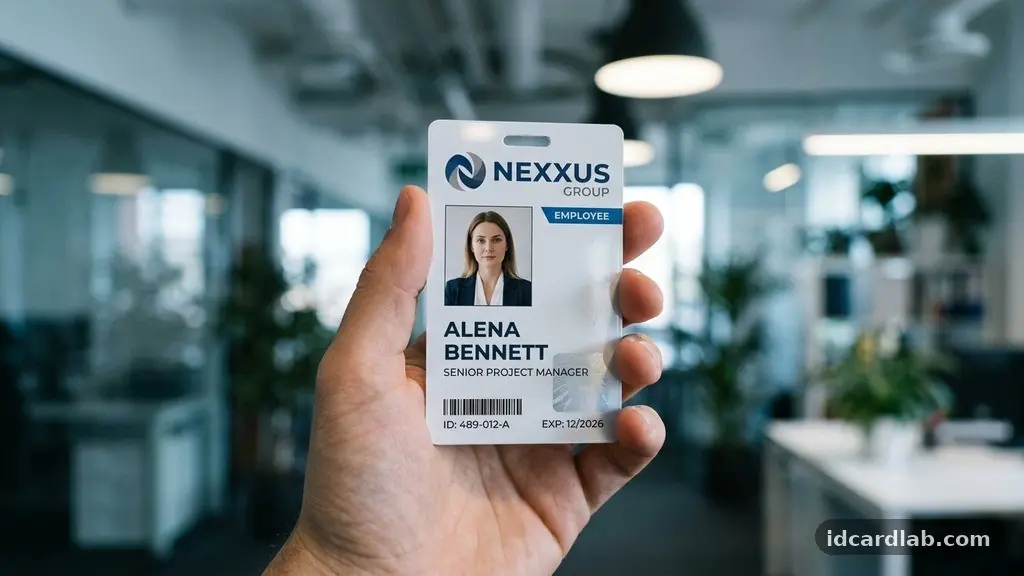
Determining where a photo should go on an ID card is a primary concern for anyone tasked with creating secure, professional identification. Most organizations find that placing the portrait on the left side of the card provides the best balance between quick visual recognition and data organization. This placement aligns with standard reading patterns in many cultures, allowing the human eye to capture the face first before scanning the associated text.
Understanding where a photo should go on an ID card? Layout tips that work often involve prioritizing the subject’s face while ensuring that surrounding elements do not clutter the visual field. This guide explores the best practices for achieving a professional, functional result.
Standard Placement for Maximum Recognition
In most professional environments, the left-hand side of a badge is the industry standard for portrait placement. This positioning is not arbitrary; it follows the natural left-to-right scanning habits of most people. By placing the face on the left, you allow security personnel or coworkers to identify the individual immediately upon glancing at the credential.
This visual hierarchy ensures that the person’s identity is the primary focal point of the card. Once the face is established, the eye naturally moves right to read the name, title, or department.
If you place the photo in the center or on the right, you often force the viewer to hunt for the identifying information. This added friction can slow down security checks at entry points or reception desks.
When designing a badge, you should also consider how the card will be worn. If the person uses a lanyard, the card may flip or tilt occasionally.
Keeping the photo on the left side ensures that the most critical piece of identification remains upright and visible even if the card shifts slightly. This is a common design strategy in high-traffic corporate settings.
Optimizing for Visual Verification
Optimizing for visual verification requires more than just picking a side for the portrait; it involves controlling the size and clarity of the image. The photo should occupy roughly 25% to 30% of the total card surface area. Anything smaller makes it difficult to distinguish facial features from a distance, while anything larger can crowd out necessary text.
You must ensure that the background of the photograph is neutral and free of distractions. A plain white or light grey backdrop is the industry standard because it provides the highest contrast for the subject’s hair and skin tones. Avoid busy patterns or office backgrounds that can confuse automated systems or human observers.
When you are setting up your ID card template, consider the lighting conditions of the workplace. If the environment is dimly lit, a high-contrast photo becomes even more important for security guards. You can also utilize specific software tools to crop images to a consistent aspect ratio, ensuring that every badge in the organization follows the same visual standard.
Balancing Branding and Functionality
Balancing branding and functionality is the ultimate challenge for any design team. While you want your company logo and colors to be prominent, they should never interfere with the primary purpose of the ID: identifying the person. Use your brand colors for borders or data fields rather than placing them behind the portrait.
If you have a long company name or a complex logo, place these elements at the top or bottom of the card. This leaves the central area free for the essential data: the name, the photo, and the expiration date. A cluttered card is a security risk because it obscures the details that matter most during a quick check.
Consider using a clear, sans-serif font for all text to maximize readability. If you have to include a lot of information, use a smaller font size rather than reducing the size of the photo. The photo is the primary anchor for identity, so it should always take priority over secondary information like office phone numbers or room codes.
Technical Requirements for Biometric Systems
If your organization uses biometric scanning or facial recognition, the placement of the photo becomes a technical requirement rather than a design choice. These systems often rely on specific coordinates to locate the face within the frame. If the image is off-center or partially covered by text, the software may fail to authorize the user.
Most modern facial recognition technology standards require that the eyes be positioned at a specific height within the vertical frame. This allows the scanner to align the facial geometry correctly. Before you finalize your layout, check the specifications of your hardware provider to see if they mandate a particular “safe zone” for the portrait.
You should also avoid placing any translucent overlays or holographic patterns directly over the eyes or mouth. While these security features are great for preventing counterfeiting, they can confuse digital scanners. Keep the area immediately surrounding the face clear of any graphical noise.
Common Layout Mistakes to Avoid
Many designers make the mistake of including excessive text on the face of the card. This creates a visual bottleneck where the eye doesn’t know where to look first. You should reserve the back of the card for secondary information like emergency contacts, disclaimers, or return addresses.
Another common error is failing to account for card clips or hole punches. If you punch a hole through the top-center of your card, ensure that no critical text or part of the photo is located in that margin. You might need to adjust your layout to leave a 5-10mm buffer zone around the edges of the card.
Finally, avoid using low-resolution images that become pixelated when printed. Even a perfectly placed photo will fail its purpose if the individual’s features are blurry. Always require high-resolution source files from your employees to maintain the integrity of your security protocols.
Data Organization and Hierarchy
Effective credential security relies on a clear, predictable layout that allows for rapid scanning. The table below outlines the recommended placement for common ID card elements to ensure a logical flow of information.
| Element | Recommended Position | Purpose |
|---|---|---|
| Portrait Photo | Left Side | Primary Identity Verification |
| Full Name | Top Right | Quick Reference |
| Job Title | Below Name | Contextual Information |
| Company Logo | Top Left or Bottom | Brand Identification |
| Security Barcode | Bottom Right | Automated Scanning |
By following this structure, you create a consistent visual language across your entire organization. When security personnel move from one building to another, they can trust that the information they need will always be in the same spot. This standardization is a core component of professional site security.
Essential Components of a Secure Badge
Beyond just the photo, a secure ID card should include several layers of protection to prevent unauthorized duplication. Many organizations incorporate these features directly into their card design to discourage tampering.
- Micro-text: Tiny, printed text that is difficult to replicate with standard printers.
- UV Ink: Invisible patterns that only appear under ultraviolet light.
- Holographic Overlays: A physical layer that adds depth and makes scanning/copying harder.
- Smart Chips: Embedded technology for access control and time-tracking.
- High-contrast Backgrounds: Ensures the photo remains the most distinct element.
When you select your printing materials, ensure they are compatible with the security features you choose. Some cards are designed specifically for re-transfer printing, which provides a higher quality image that is more durable over time. Investing in quality materials is just as important as the layout design itself.
The Role of Orientation and Scaling
Deciding between portrait orientation and landscape orientation is often a matter of personal preference, but it does impact how the card is perceived. Portrait orientation is generally better for displaying a vertical photo and a name. It feels more like a traditional ID or passport-style document.
Landscape orientation offers more horizontal space, which can be useful if you have a wide company logo or need to include a long job title. However, landscape cards can sometimes look like standard business cards, which may not carry the same “official” weight as a vertical badge. Choose the orientation that best fits your specific data needs.
Regardless of the orientation, consistency is key. Once you choose a layout, stick to it for all employees.
If you have different departments, use color-coded borders to distinguish them rather than changing the layout itself. This makes it easier for staff to identify visitors versus employees at a quick glance.
FAQ About ID Card Design
How large should the photo be on an ID card?
The photo should typically cover about 25% to 30% of the card surface. It must be large enough to be clearly recognizable by a human observer at a distance of a few feet.
Can I put the photo on the right side instead of the left?
While you can, it is generally discouraged. Most people scan from left to right, and placing the photo on the left ensures it is the first thing seen, which speeds up identification.
What is the best background for an ID photo?
A solid, neutral background—preferably white or light grey—is the best choice. It provides the necessary contrast to ensure the facial features stand out clearly against the background.
Should I include a company logo on the front of the ID?
Yes, including a logo is important for brand identification. However, ensure it is placed in a corner or header area where it does not interfere with the photo or the text information.
How do I make sure the photo doesn’t get pixelated?
Always use high-resolution image files for your ID card templates. If you are resizing the image, use professional design software to ensure the aspect ratio remains correct and the quality is preserved during the print process.
Closing Thoughts on Badge Layouts
Designing an effective identification card is a balance between art and utility. When you consider where a photo should go on an ID card? Layout tips that work always prioritize the person’s face as the primary identifier.
By keeping the portrait on the left and maintaining a clean, predictable hierarchy of information, you create a system that is both secure and professional. Take the time to standardize your templates, choose high-quality materials, and ensure your layout accounts for the needs of your security staff.
With these elements in place, your ID cards will serve as a reliable tool for identity verification for years to come. If you have questions about your specific design, feel free to reach out to your printing provider for additional technical guidance.