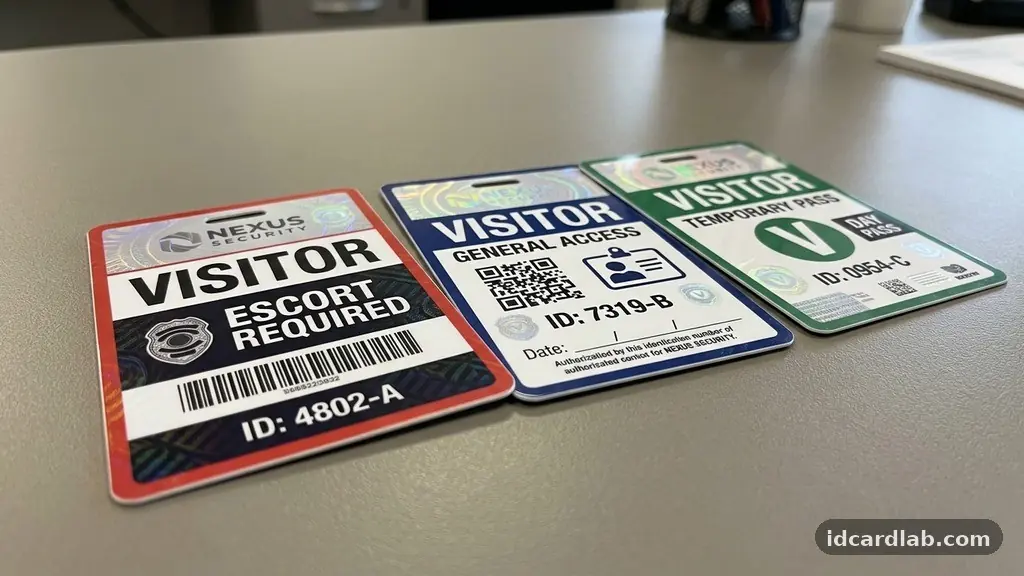
Implementing effective Visitor ID Cards: Design Features That Help Staff Identify Guests is a fundamental step toward maintaining a safe and professional environment. By focusing on visual cues and clear information, organizations can ensure that employees recognize authorized guests at a glance. This article examines the essential elements that differentiate a secure badge from a simple paper tag, helping you prioritize safety through smart design choices.
Whether you are managing a corporate office or a secure manufacturing site, these features serve as the first line of defense in your facility security. Understanding these components will help you streamline your credential verification process while keeping your staff informed and alert.
Core Visual Identification Standards
The primary goal of any visitor badge is to provide immediate visual identification that separates guests from permanent staff. A well-designed card should feature a large, high-contrast font that displays the word “VISITOR” prominently at the top. This simple text indicator removes any ambiguity when staff members encounter someone in an office hallway or warehouse floor.
Beyond text, the layout must prioritize the visitor’s name and the date of their visit. By keeping these details large and legible, you enable employees to greet guests by name while simultaneously confirming that the badge is current. Consistency is key; if every visitor wears the same style of card, staff will eventually learn to ignore them, which defeats the purpose.
Color-Coding for Instant Recognition
Color-coding is one of the most effective strategies for enhancing security protocols in busy environments. By assigning specific colors to different visitor types, staff can instantly distinguish between contractors, vendors, and general guests. For instance, a bright red border might indicate a high-security area visitor, while a blue border denotes a standard meeting guest.
This method relies on the psychology of color, where the brain processes the category of the visitor before it even reads the text on the card. You should implement a system that is easy for your team to remember without needing a manual. Keep the color palette limited to three or four distinct shades to avoid confusion during rapid visual checks.
The Role of High-Quality Photo ID
Including a photo on a visitor badge significantly raises the bar for security. While many temporary badges rely on names alone, a photo ID ensures that the person wearing the card is actually the person who registered at the front desk. This prevents the common security lapse of guests passing badges to unauthorized individuals after clearing the initial security check.
Most modern visitor management systems allow for quick digital capture using a simple webcam at the reception desk. Once captured, this image can be printed directly onto the badge using thermal printing technology. The result is a professional, tamper-evident credential that adds a layer of accountability to every person on your premises.
Leveraging Expiration Indicators
One of the greatest challenges in physical security is ensuring that visitor access remains temporary. Advanced badge stock often features “expiring” technology, where a color-changing chemical reaction occurs over a set period, usually 24 hours. After the time limit, a red “VOID” pattern appears on the face of the card, making it impossible to reuse.
This feature is invaluable for staff because it removes the need to check dates on every single person they pass. If they see a clear, clean badge, they know the guest is authorized for that day. If they see the “VOID” indicator, they know immediately that the visitor’s credentials have lapsed and they should report to the front desk.
Advanced Security and Holographic Overlays
For facilities that require a higher level of protection, incorporating holographic overlays into the badge design is a wise choice. These overlays create a complex, shimmering pattern that is difficult to replicate with standard office equipment. Even a simple, generic hologram can act as a deterrent against badge forgery or tampering.
When a badge is presented, the way the light catches the hologram provides an immediate sense of authenticity. Staff members do not need to be experts in anti-counterfeiting to notice when a badge looks “off” compared to the standard ones. This subtle feature provides peace of mind for sensitive areas where unauthorized access could lead to significant risks.
Choosing the Right Lanyards and Badge Holders
The way a badge is displayed is just as important as the design of the card itself. Using high-visibility lanyards, such as those in neon orange or bright yellow, makes the ID stand out against common office attire. If your facility requires specific PPE, consider using badge holders that can clip directly to a vest or a belt loop.
The goal is to ensure the badge remains at eye level or chest height, where it is most likely to be seen during a conversation. Avoid allowing visitors to tuck their badges into pockets or hang them too low. A standard, branded lanyard also reinforces the idea that the visitor is an official guest of the company.
Data Integration and Credential Verification
Modern visitor management systems do more than just print a name on a piece of plastic; they store data that can be audited later. By linking your badge printer to your database, you can ensure that every guest is checked against a watchlist before their ID is produced. This process of automated credential verification adds a layer of security that manual logs simply cannot match.
You can learn more about these digital processes by reviewing the guidelines provided by the Cybersecurity and Infrastructure Security Agency regarding facility protection. Integrating these systems means your staff can trust that anyone with a printed badge has already passed your security requirements. It effectively shifts the burden of screening away from the individual staff member and onto the system itself.
Comparison of Badge Security Features
To help you decide which features are necessary for your specific environment, the table below highlights the effectiveness of different design elements.
| Feature | Security Level | Primary Benefit |
|---|---|---|
| Basic Name Tag | Low | Low cost, easy to implement |
| Color-Coded Badge | Medium | Instant visual categorization |
| Photo ID Card | High | Prevents badge swapping |
| Expiring Badge | High | Prevents unauthorized reuse |
| Holographic Overlay | Very High | Prevents counterfeiting |
Common Questions About Visitor Badging
How often should we change our badge designs?
It is best to rotate the background color or the design template at least once a year. This ensures that long-term staff do not become complacent and that you can easily spot outdated badges being used by mistake.
Do photo IDs slow down the check-in process?
Modern software can capture and print a photo in under 30 seconds. While it adds a small amount of time, the security benefit of verifying the visitor’s identity far outweighs the minor delay.
Can we use standard inkjet printers for visitor badges?
Standard inkjet printing is generally discouraged because the ink can smudge or fade. Thermal printing is preferred because it is durable, fast, and produces text that is resistant to environmental wear and tear.
Are expiring badges worth the extra cost?
For most businesses, the answer is yes. The cost of an expiring badge is a small fraction of the potential risk associated with an unauthorized person roaming your facility for multiple days.
What should staff do if they see a visitor without a badge?
Staff should be trained to approach the individual politely, ask if they need assistance, and direct them to the reception desk. The focus should be on helpful guidance rather than confrontation.
Best Practices for Your Team
* Mandate that all guests sign in and receive a badge before entering common areas.
* Train your front-desk team to verify government-issued IDs during the registration phase.
* Ensure that badges are clearly visible at all times while the guest is on-site.
* Establish a clear “escort policy” for guests entering restricted or sensitive zones.
* Collect all badges at the exit to prevent them from being brought back into the building.
* Perform a monthly audit of your visitor logs to identify any patterns or gaps in security.
Maintaining a secure workplace requires a combination of clear policy and reliable tools. By utilizing effective Visitor ID Cards: Design Features That Help Staff Identify Guests, you create a culture of safety that empowers your employees to take an active role in facility security. Start by assessing your current check-in procedures and identifying which of these features could be added to your existing workflow.
Even small changes, such as switching to color-coded lanyards or implementing a photo capture system, can have a significant impact on your overall security posture. Reach out to your local security equipment provider to see which of these technologies fits your budget and operational needs today.